pH Probe
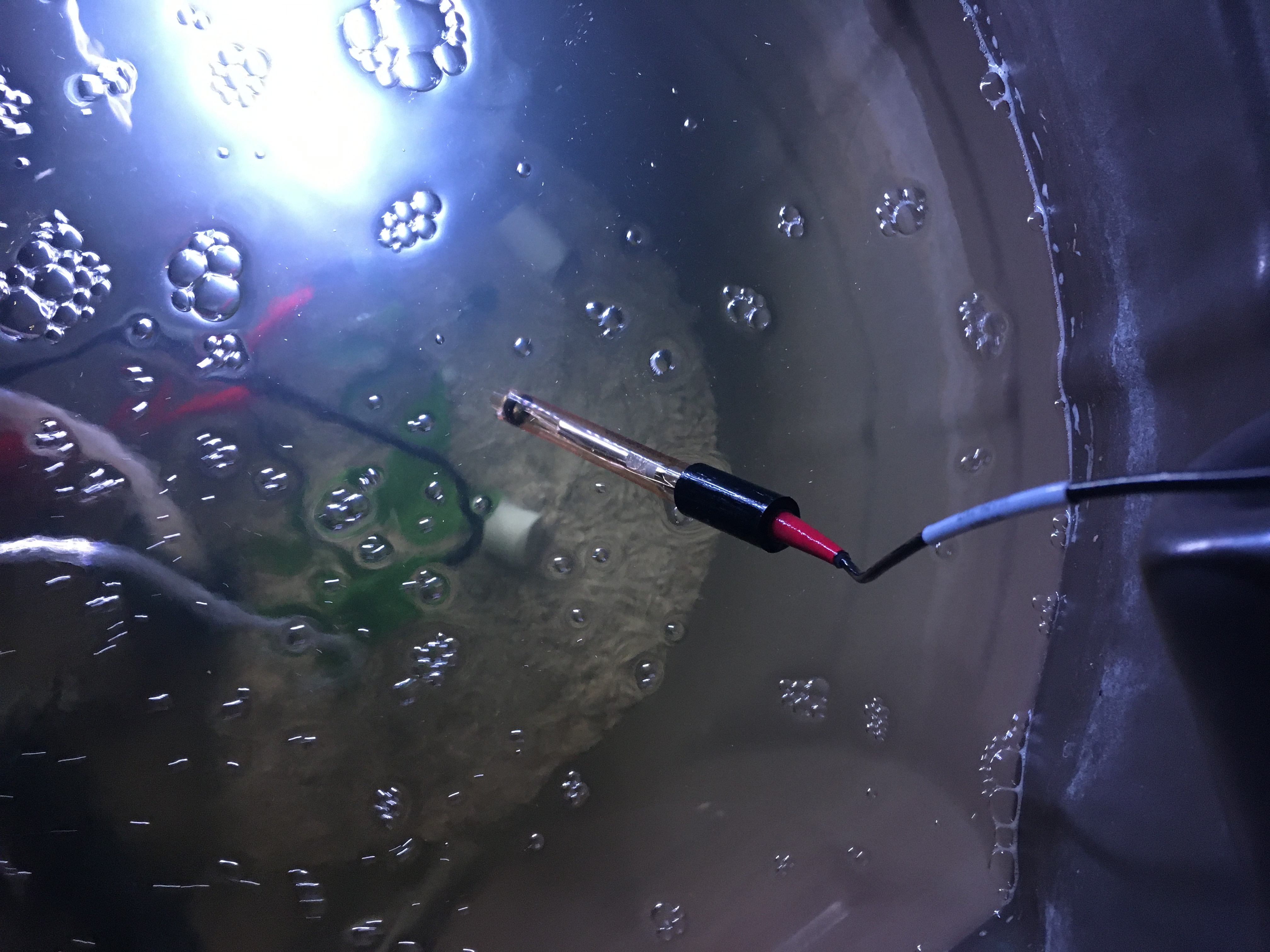
The pH probe is a waterproof probe that has all of its wires protected by a plastic coating. The probe itself is a metal p that is currently sitting on the bottom of my tank. I found the probe on Atlas Scientific’s website. I do recommend this pH sensor because it comes with all the required documentation and python code that works well with the RPi. You can look around their website as there are other interesting things, including other probes
Here is what the probe looks like in my system.
Wiring
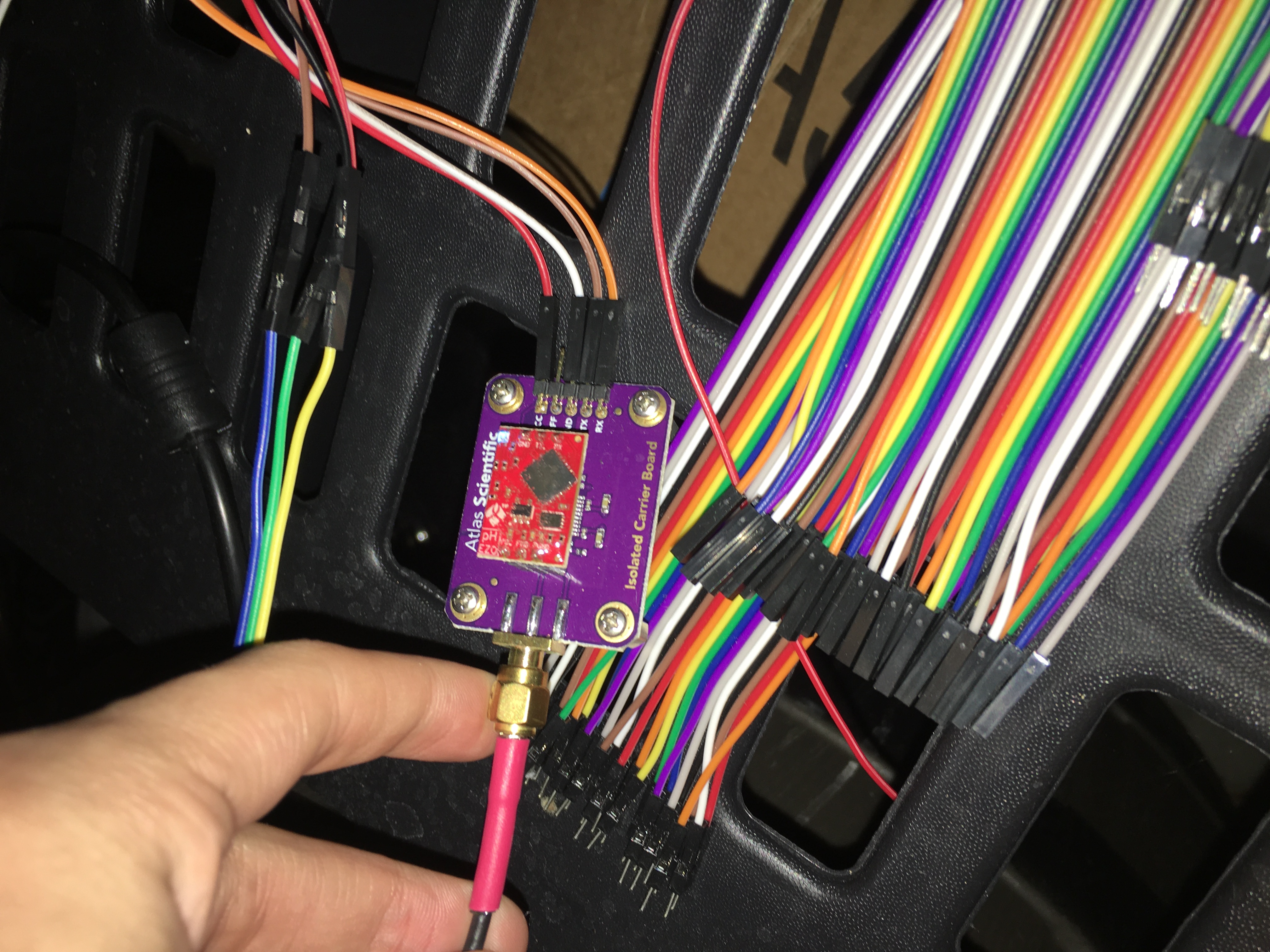
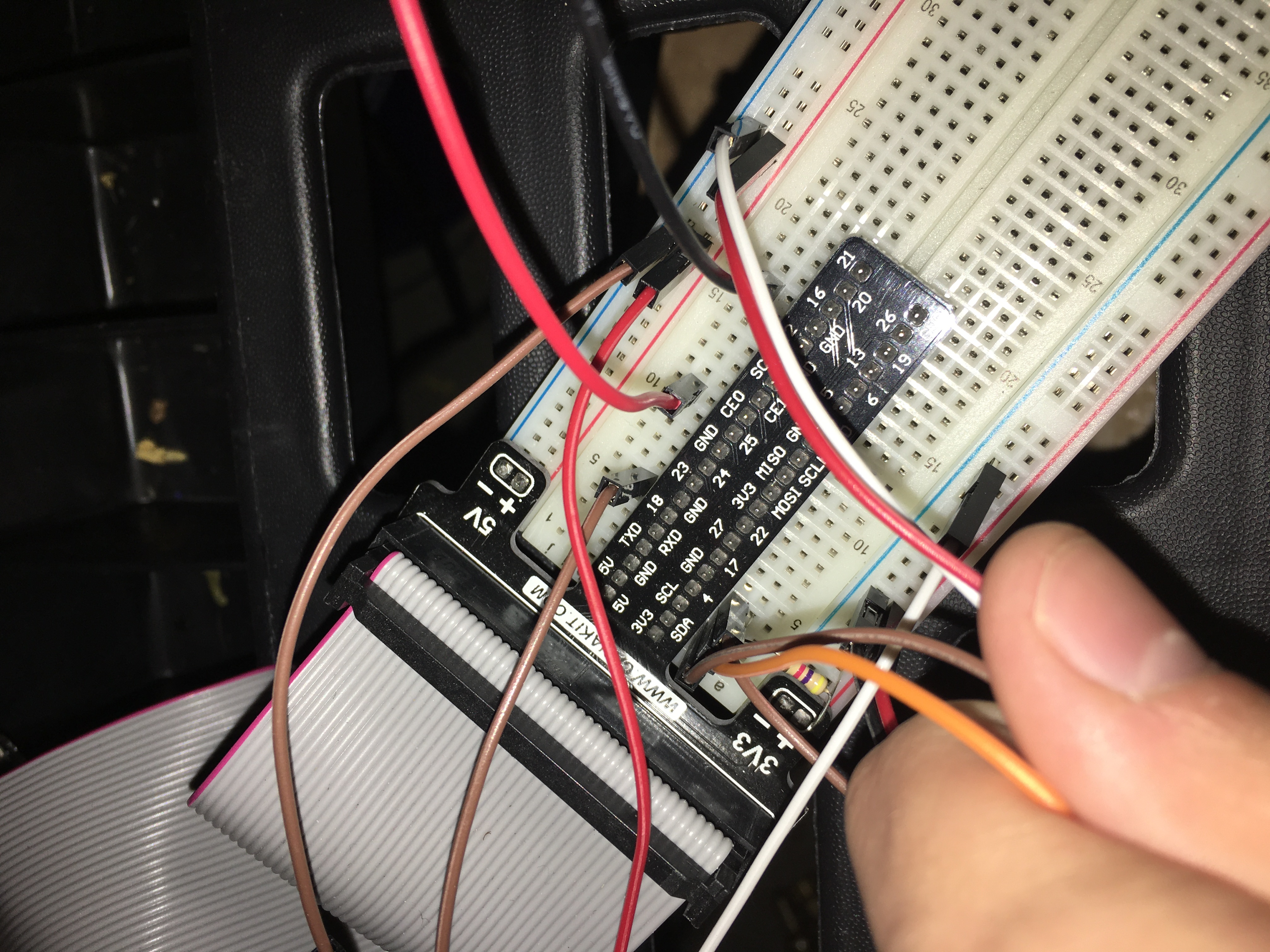
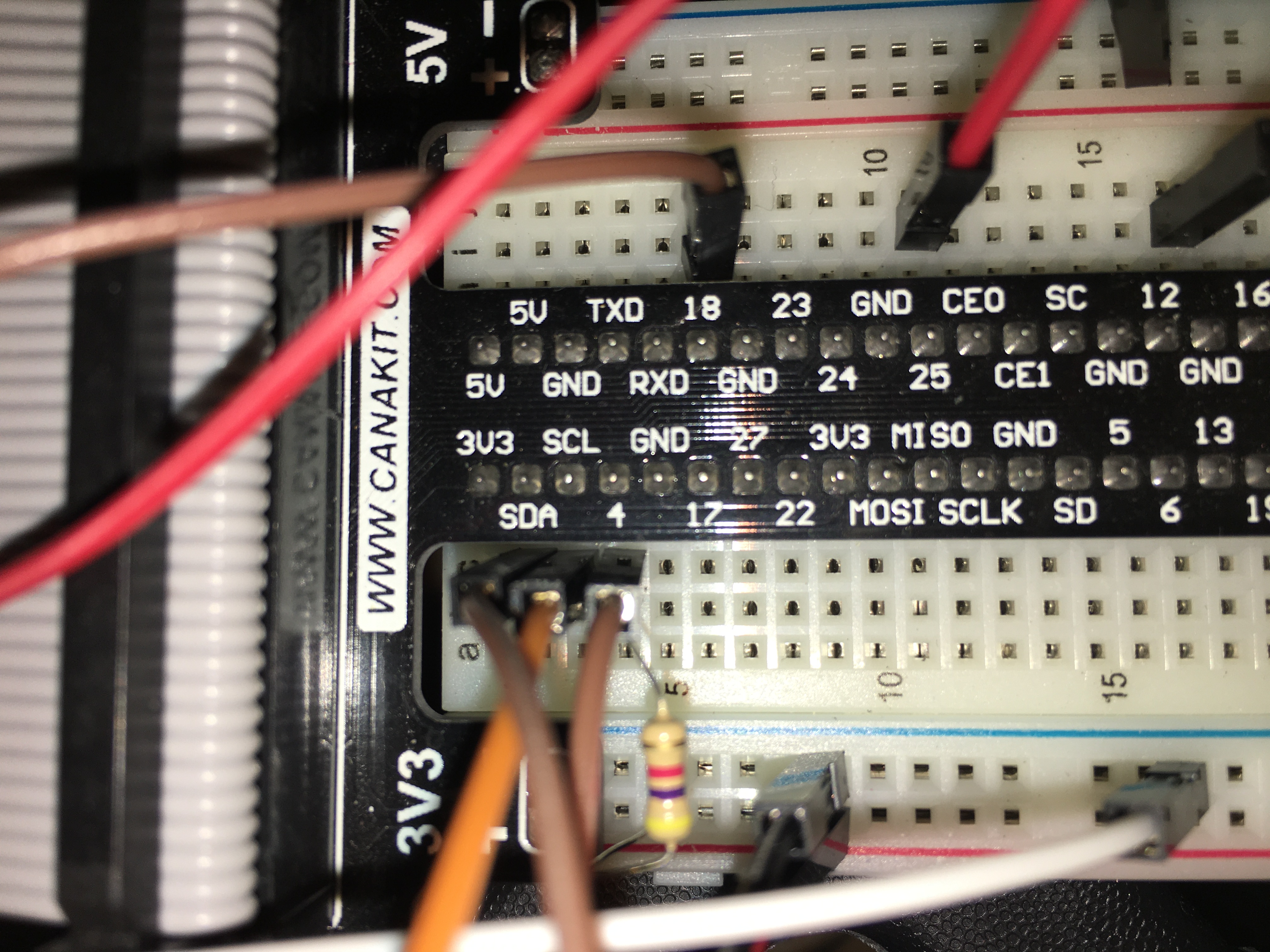
The wiring for the pH probe is easy if you have a breadboard. The pictures go place by place where the probe wires go into the module, the module connects to the breadboard, and which ports specifically are for the wiring (SDA and SCL are the ports that are used for I2C).
Code
This code is pretty messy compared to the last one. It is also pretty confusing if you don’t know much about coding, but I hope I can explain the lines well enough for you. I made this with Python:
import io
import fcntl
import time
import string
import sys
The module imports cause several different things to happen that won’t normally happen when you don’t have the modules. The io module is used to create file streams. The fcntl module is used to access I2C parameters like addresses. I2C is a way for the probe to talk to the RPi. The time module is used for the sleep delay and timestamps. Finally, the sys module is the system module which allows me to open and modify different files.
class atlas_i2c:
    long_timeout = 1.5
    short_timeout = .5
    default_bus = 1
    default_address = 99
This describes all of the variables that will be used below. The long timeout is used for query readings and callibrations. The short timeout is used for the other regular commands. The default bus is where the I2C is on newer Raspberry Pis. The address is for talking to the pH sensor. If you have other sensors, you have to change that or else it will only talk to one or neither of them.
    def __init__(self, address=default_address, bus=default_bus):
        self.file_read = io.open("/dev/i2c-" + str(bus), "rb", buffering=0)
        self.file_write = ip.open("/dev/i2c-" + str(bus), "wb", buffering=0)
        self.set_i2c_address(address)
This opens two files, one for reading and one for writing. The specific I2C channel is selected with bus and it is usually 1. Wb and Rb indicate binary read and write. The self set i2c address sets the I2C address to either the default address or to the user specified one.
    def set_i2c_address(self,addr):
        I2C_SLAVE = 0x703
        fcntl.ioctl(self.file_read, I2C_SLAVE, addr)
        fcntl.ioctl(self.file_write, I2C_SLAVE, addr)
This section sets the I2C communications to the slave specified by the address. The commands for I2C dev using the ioctl functions are specified in the i2c-dev.h file from i2c-tools.
    def write(self, string):
        string += "\00"
        self.file_write.write(bytes(string, 'UTF-8'))
This appends the null character and sends the string over I2C.
    def read(self, num_of_bytes=31):
        res = self.file_read.read(num_of_bytes)
        response = [x for x in res if x != '\x00']
        if response[0] == 1:
            char_list = [chr(x & ~0x80) for x in list(response[1:])]
            return ''.join(char_list)
        else:
            return "Error " + str(response[0])
This reads a specified number of bytes from I2c then parses and displays the result. The self file read reads the board and removes the null characters to get the response. If the response isn’t an error, then it changes MSB to 0 for all received characters except the first and get a list of characters. Then it converts the character list to a string and returns it. If it is an error then it returns an error plus the response.
    def query(self, string):
        self.write(string)
        if((string.upper().startswith("R")) or (string.upper().startswith("CAL"))):
            time.sleep(self.long_timeout)
        elif((string.upper().startswith("SLEEP"))):
            return "sleep mode"
        else:
            time.sleep(self.short_timeout)

        return self.read()
This writes a command to the board and waits the correct timeout and read the response. Then the read and calibration commands require a longer timeout.
    def close(self):
        self.file_read.close()
        self.file_write.close()
This one closes the program if you type it in the command box.
def main():
    device = atlas_i2c()
    #print(">> Atlas Scientific sample code")
    #print(">> Any commands entered are passed to the board via I2C except:")
    #print(">> Address,xx changes the I2C address the Raspberry pi " "communicates with.")
    #print(" where xx.x is longer than the {} second timeout.".format(atlas_i2c.long_timeout))
    #print(" Pressing ctrl-c will stop the polling")

    while True:
        print(device.read())
'''
        myinput = input("Enter command: ")
        if(myinput.upper().startswith("ADDRESS")):
            addr = int(myinput.split(',')[1])
            device.set_i2c_address(addr)
            print("I2C address set to " + str(addr))
        elif(myinput.upper()startswith("POLL")):
            delaytime = float(myinput.split(',')[1])
            if(delaytime < atlas_i2c.long_timeout):
                print("Polling time is shorter than timeout, " "setting polling time to {}".format(atlas_i2c.long_timeout))
                delaytime = atlas_i2c.long_timeout
            info = device.query("I").split(",")[1]
            print("Polling {} sensor every {} seconds, press ctrl-c " "to stop polling".format(info, delaytime))
            try:
                while True:
                    print(device.query("R"))
                    time.sleep(delaytime - atlas_i2c.long_timeout)
            except KeyboardInterrupt:
                print("Continuous polling stopped")
        else:
            try:
                print(device.query(myinput))
            except IOError:
                print("Query failed")
'''
The device = atlas i2c creates the I2C port object (sometimes you have to specify the address). The next five lines are lines that I commented out. Commenting out is where you tell the program to ignore that part of the script. I didn’t want to delete them in case I want or need them later. The next part is the main loop. I added the print(device.read()). That just prints what the probe is reading. The part after the three apostrophes (‘’’) tell the program to ignore the part of the script in between them and the next three apostrophes. This ultimately causes a commenting out of an entire section so I don’t have to comment out each line.
if __name__ == '__main__':
    #main()
    device = atlas_i2c()
    while True:
        sys.stdout = open("/var/www/html/ph.txt", "a")
        print(device.query("R"))
        sys.stdout.close()
        time.sleep(59)
This is the main script that actually runs. It says if the name of the script is main, then create the device port and then open a file at the location /var/www/html/ that is called ph.txt. Then it will add what the next line says to add. It then prints what the device read and then saves and closes the file and then sleeps for 59 seconds.
Fishy Updates
None of the fish have died! They are all growing pretty well. Tank is massive as always. I will be off to college for the next couple of months so my family will be taking care of them while I am away until I can move them to the campus.
Up Next
The next post will be an update about the system, the website I use, or an automated fish feeder that I am planning on making.